Re-calendar
What it is
A reMarkable 2 shows the family's Google Calendar as its sleep screen. Put the tablet down and it suspends showing this week. Pick it up and it's an ordinary reMarkable again. A small server on the home network syncs Google Calendar every 15 minutes and renders the e-ink image. The tablet wakes every 30 minutes, fetches the image, and goes back to sleep. A charge lasts about a week.
| Part | Language | Size |
|---|---|---|
| server: sync, render, health check | Python (FastAPI) | ~11k lines including tests |
| tablet side: install and refresh scripts | shell, a 60-line C key injector, plus an abandoned Rust app | ~3k lines of Rust |
| deployment | a NixOS module | systemd unit, credentials loaded from files |
A second, "interactive" surface is built but not yet verified on the device. It generates an ordinary reMarkable notebook that you write in with the real pen, then reads your markup back.
None of that was the original plan. The rest of this page is how it got there.
How it got here
| When | What happened |
|---|---|
| April 15–19 | A native Rust app for the tablet. Got as far as a month view, then was abandoned. The sleep-screen renderer went in the same day. |
| July 25–26 | Rethought as two surfaces. Made a sleeping tablet wake, fetch and repaint. First real calendar data. Six layouts by the end of the next afternoon. |
| August | It ran for a week, then stopped silently. Made it survive restarts. Chased Wi-Fi and network problems. |
| September | Survived (eventually) an OS update that wiped the install. Added a second family member's calendar. |
| October | Published a scrubbed public copy. |
April: a native app that couldn't match the pen
The first plan was a full reMarkable application in Rust. It had month, week, day and todo views, two-way Google sync, and handwriting: write an event into a day's time slot and the server would OCR it and add it to the calendar.
The display stopped it twice.
- The usual library didn't work on the tablet's OS. The library the plan was built on, libremarkable, draws to
/dev/fb0. On OS 3.25 that device still existed but drove nothing. Writes to it produced no visible output, because the real e-ink controller is driven privately by the stock reader app (xochitl). The app launcher the plan used (Oxide) didn't support 3.25 either. Downgrading the OS would have meant giving up security updates for good, so the tablet was upgraded to 3.26 instead, to use the community AppLoad launcher and itsqtfbdisplay client. - It drew, but couldn't feel like a reMarkable. A hello-world rendered on April 19. Grey came out black, because the update call it used drew with a one-bit waveform. A month view followed the same day, in five visual themes cycled on the real panel. Theme D won: outlined event bars, an outlined square for today. Filled bars made the screen feel heavy, dots lost the event titles, and the minimal theme was too small to read. There was also a pen "scribble" test. But
qtfbonly exposes the slow, full-quality refresh modes. The fast waveform that makes the stock pen feel instant can only be reached from inside xochitl. An app you write in has to feel like writing on the reMarkable, or there's no point using one.
So the Rust app was dropped (~3k lines, still in device-app/). The commit that added the sleep-screen PNG renderer that evening calls itself the "first surface of the post-pivot architecture".
July: two surfaces, no mode switch
The project sat until late July. The author restarted it with a clearer brief:
okay so this was an interesting project so far, but really the goals are to be able to have something passive that shows upcoming stuff and is always on/up to date as well as something that is good for going over a calendar, marking it up, handling todo lists and stuff.
The answer was to use the two states the tablet already has. Asleep, it shows the sleep screen, a picture e-ink holds without using power. Awake, it runs xochitl, so the interactive part became an ordinary notebook with the native pen, eraser and pressure. Nothing has to switch modes.
The first design pushed new images to the tablet over SSH. The author caught the flaw straight away:
wait the passive surface would still need for the device to be on, when it's actualyl asleep you can't ssh the new image onto it!
They were right. On suspend, a stock reMarkable script unloads the Wi-Fi driver entirely, so a sleeping tablet isn't on the network at all. Then:
Hmm maybe the tablet should wake up and pull instead? Also you gotta make sure that the screensaver actually updates when you push a new one
Both points shaped everything that followed.
Getting a sleeping tablet to repaint
Waking was easy. The tablet's clock chip can wake it from suspend. A 90-second test alarm brought it back in 81 seconds. A systemd timer with WakeSystem=true now fires every 30 minutes, and a script fetches the PNG and swaps it into place.
Repainting was not. The first checks looked fine: the file was read on a sleep, and the screen changed. Then the stamp in the corner stopped moving.
the stamp has not changed, you'll need to investigate either how to make the tablet stay awake or see how to refresh the screensaver manually on wake up
xochitl's own logs explained it. It treats a timer wake as an "upkeep wakeup" and goes back to deep sleep without ever turning the display on. It only paints the sleep screen when the display goes from on to asleep. Every repaint seen so far had followed someone actually handling the tablet. Left alone, it would have slept for 12 hours at a stretch and never touched the panel.
| Tried | Result |
|---|---|
| writing a new image file | not enough: never read on a timer wake |
systemctl suspend from the script |
worse: the system slept around xochitl and left the normal reading UI frozen on the panel |
| restarting xochitl each cycle | rejected: would close whatever you had open |
| keeping the tablet awake | rejected: the sleep screen is never shown, and it brings back the redraw problem that killed the Rust app |
| two synthetic power-button presses | works: on, then off, and the "off" is when xochitl paints |
The injector is a 60-line C program that creates a virtual keyboard through Linux's /dev/uinput. It only works because xochitl listens for new input devices being plugged in, which was checked on the device before building it. It took several builds. The first cross-compiled binary failed with cannot execute: required file not found, because Nix had baked a loader path into it that doesn't exist on the tablet. The script also skips the cycle when the display is already on, so it never puts the tablet to sleep while someone's holding it.
Proving it worked cost hours. Each test waited out a real 30-minute cycle, and most were spoiled because the tablet had been picked up in the meantime. The author asked why the timer couldn't just be sped up for testing. A 2-minute override settled it in 9 minutes: 6 repaints fired and 4 were correctly skipped.
Two other things measured along the way. After a timer wake, Wi-Fi took about 15 seconds to come back, so fetches usually succeeded on the fourth try. The retry loop is load-bearing. And each refresh costs two visible flashes of the panel.
Real data broke the first layout
Until July 26 every event on the screen was invented test data. Google sign-in finally worked that night (after first being blocked because the app's consent screen was still in Google's "Testing" mode, which would also have expired the login every 7 days). Real events exposed two bugs at once:
- Titles overran their columns. Truncation guessed a character count instead of measuring the text, so long titles ran into the next column and off the edge.
- Fixed bands didn't fit a real week. Today and tomorrow each had a fixed slice of the screen. Both were empty and took about 75% of the panel, while the week's actual events were crushed into 200-pixel columns along the bottom.
The fix was adaptive bands, sized to their content, with the outlook running up to 28 days ahead to fill a quiet week. Then the author asked:
Hmm is it possible to ship multiple layouts and be able to toggle between them (in the custom app) to improve iteration time?
There was no custom app any more, so the toggle went into the server (?layout=) and the tablet's config. A cycle mode stepped to the next layout on each power press, the same trick used to pick the April month theme. The reason is in the code: e-ink contrast and legibility at a distance can't be judged on a monitor. That night there were three: adaptive, agenda, focus.
Six layouts, then eight
The next afternoon:
I'd like to iterate a bunch on what is displayed on the sleep screen, could you just spin up a website that allows us to iterate quickly?
The "sleep studio" is a local page that redraws whenever the renderer is saved, compares layouts side by side, and has made-up datasets for the awkward cases (empty, busy, very long titles). Judging layouts by waiting for the real calendar to produce an interesting week doesn't work. The first verdict:
Hmm dejavu bold and adapative seems like the best, I do wonder if there's more we could do with non-text also it doesn't seem like it handles multi day things very well
The multi-day complaint turned out to be a data bug, not a drawing one. The Google sync threw away each event's end date, so a week-long trip showed only on its first day and vanished after. Fixing that uncovered another: re-syncing an event that was already stored crashed, so old events could never pick up the new field.
Three picture-based layouts went in to answer the "non-text" question: ribbon, timeline and month. That made the six. Here they are, rendered by the project's own renderer from an invented household:
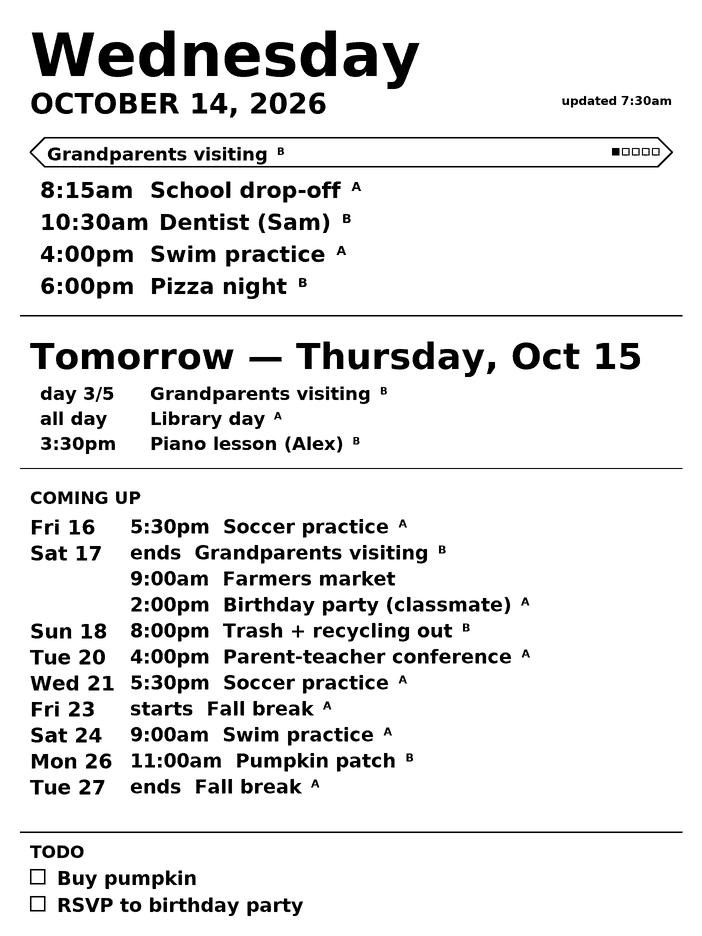
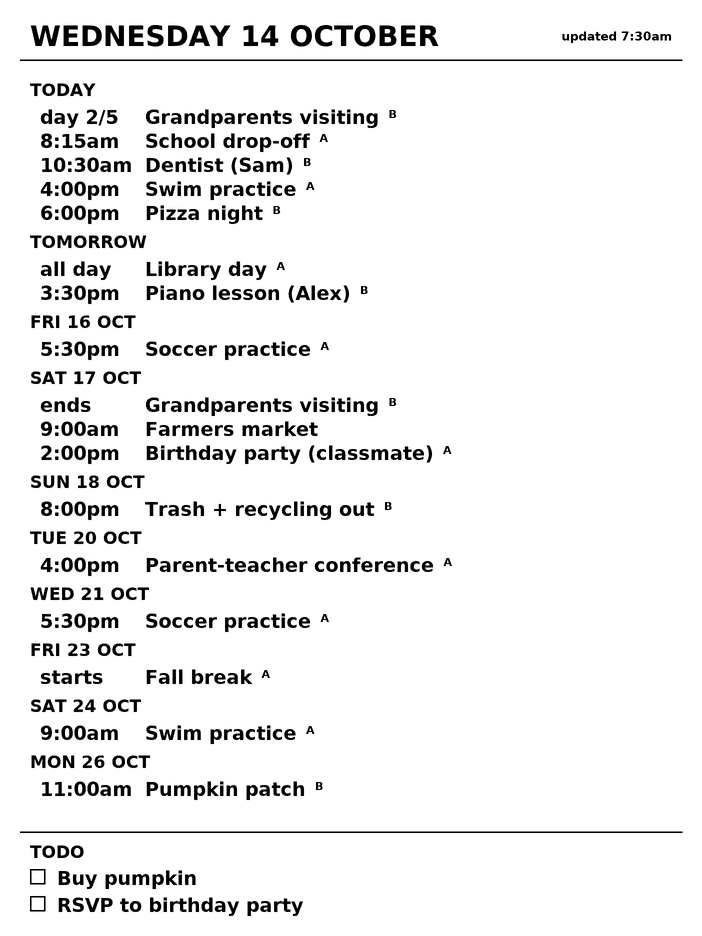
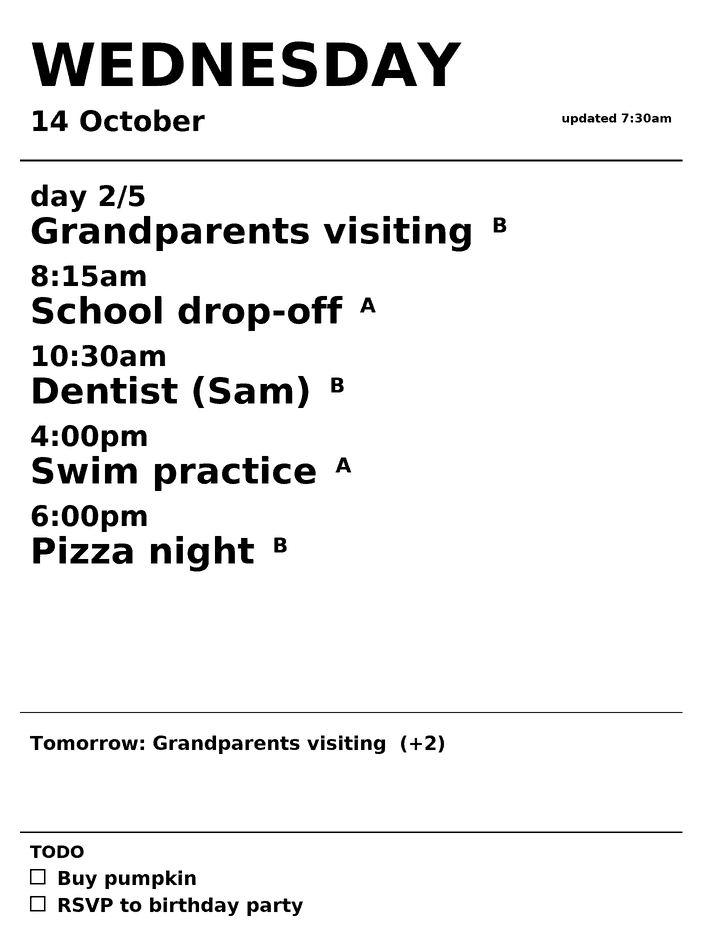
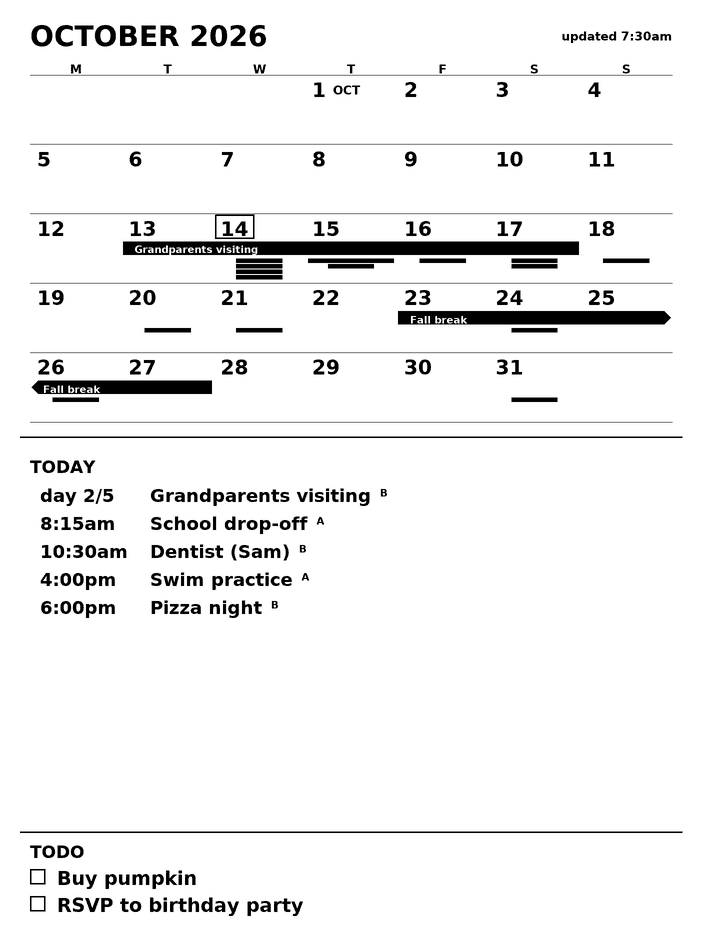
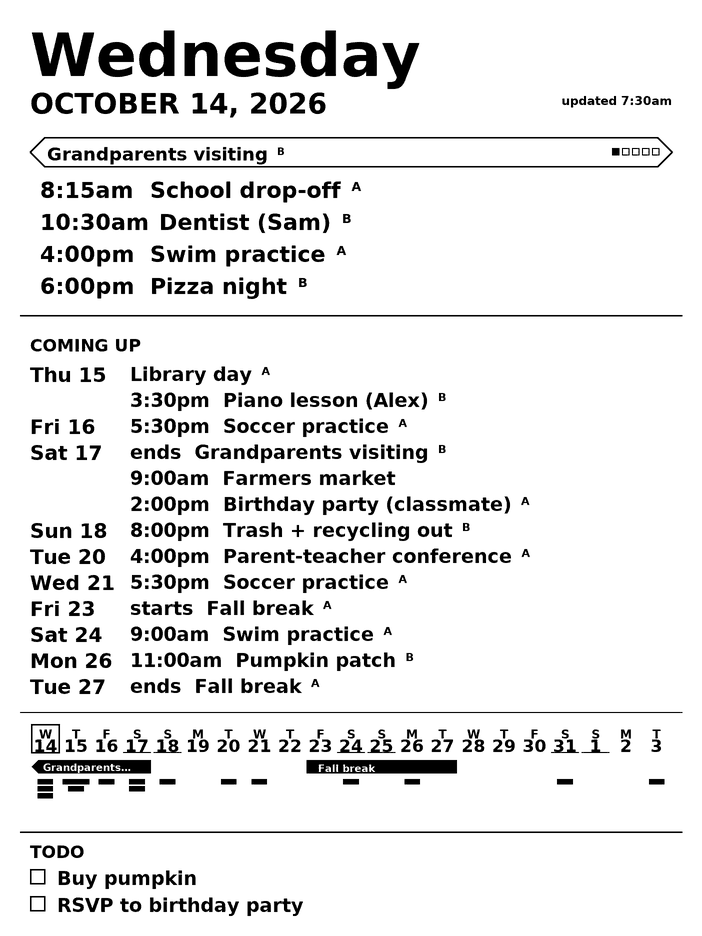
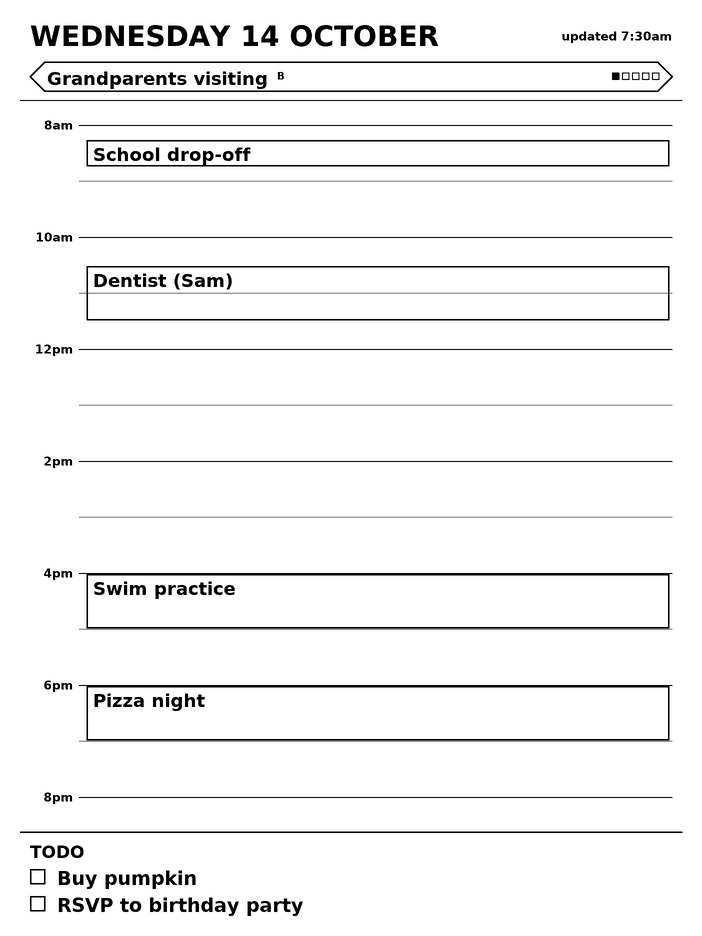
The demo data is made up. The real screen also uses this renderer, so it looks the same.
Two more went in that afternoon. weeks is the month grid rolling from the current week, so no rows are spent on the past. calendar came out of the verdict on the ribbon:
Great adapative looks the best, I like the idea of ribbon, but at least with the live data it doesn't actually show much going on
The real calendar was sparse. The ribbon's fixed two weeks reached only 7 of the 11 upcoming events, and none of them had multi-day bars yet, so it was mostly empty axis. The ribbon was changed to stretch out to the last event. calendar puts a five-week grid in the same strip instead. That makes eight, and they're all still in the code. Adaptive is the default, and it's what stands on the cabinet in the essay's photo.
The owner mark
In September the server started pulling a second family member's calendar too, and every row got a letter at the front showing whose it was. The author didn't love a letter on every item. They suggested an asterisk, or a small superscript letter added only when the owner changes, since a run of one person's events doesn't need repeating.
Four variants went side by side (superscript, asterisk, full-size letter after a dot, letters in a right-hand column), plus "mark every row" against "mark only where the owner changes". The pick was:
yeah I like the superscript and only mark on changed
That's the small raised letter after some titles in the images above.
The lesson it taught
It ran for a week, then stopped, and nothing anywhere said so. The author, in August:
Okay so this was working great! It yielded over a weeks worth of battery life. But both of them have now restarted and neither are working anymore. How should we make this durable?
In the project's own words: a passive surface cannot report its own failure. A sleep screen showing a three-week-old calendar is pixel-for-pixel as convincing as one showing a quiet week. Three things had quietly stopped holding:
| What broke | Why it was invisible | What it is now |
|---|---|---|
| the server was a hand-started process | a reboot ended it, and the tablet kept showing the last image | a systemd unit that always restarts |
| nothing pulled from Google | sync only happened when someone asked | a 15-minute sync loop that records its outcome |
| addresses were hardcoded | the router changed subnets and broke both directions at once | the tablet caches the last working address and searches its subnet to recover |
Now the screen says when it's stale: the corner stamp updated 1:53pm becomes updated 1:53pm · calendar 3d old. A health endpoint returns 503 when the data is old. Because the tablet sleeps with its Wi-Fi off, the only proof it's alive is that it keeps showing up to fetch, so the server records that too.
That wasn't the last of it. Each later failure looked the same from across the room: an old calendar.
| When | What the screen did | The actual cause | What changed |
|---|---|---|---|
| late August | stuck for six days | after a timer wake, Wi-Fi took until the 9th try and then dropped; the server still logged the download as fine | twice the retry budget |
| early September | stuck for two weeks | the tablet had been switched off with the power button, not crashed. The wake timer works from sleep, not from off | nothing to fix; check the boot log first |
| September 18 | back to the stock sleep screen | an OS update (3.26 → 3.27 → 3.28 in one day, despite auto-update being turned off) replaced the system partition and wiped the timer and scripts. Only /home survives |
a "healer" on the server finds the tablet every 10 minutes and reinstalls |
The update failure is the clearest case of the lesson. The new alert fired six hours later, exactly as designed, and the calendar still stayed wrong until someone acted on it. Detecting the failure was never the gap. The tablet can't repair itself, because nothing it runs at boot lives on the partition that survives. So the fix lives on the server.
Still open
- The interactive notebook has been pushed to the tablet once (July 26). That confirmed xochitl only notices an injected document after a restart, and that it replaces every page ID. But no handwriting has been read back yet. The step that maps ink positions to the right hour, and OCR on real handwriting, are both untested.
- Two known costs of the repaint trick are still on the list: the two panel flashes every 30 minutes, and a theoretical risk that the system treats a synthetic power press as "power off".